 KDE 3.5 API Reference
 kviewshell
KMultiPage Class Reference
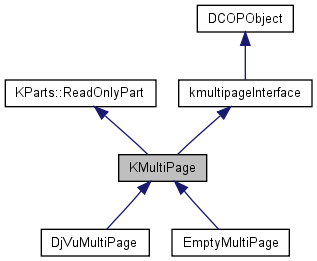
This class provides plugin-specific GUI elements for kviewshell plugins. More...
#include <kmultipage.h>
Public Slots | |
| virtual void | clearSelection () |
| virtual void | copyText () |
| virtual void | doExportText () |
| virtual void | doGoBack () |
| virtual void | doGoForward () |
| virtual void | doSelectAll () |
| virtual void | findNextText () |
| virtual void | findPrevText () |
| virtual void | firstPage () |
| virtual void | generateDocumentWidgets (const PageNumber &startPage=PageNumber::invalidPage) |
| virtual void | gotoPage (const Anchor &a) |
| virtual bool | gotoPage (const PageNumber &page) |
| virtual void | lastPage () |
| virtual void | nextPage () |
| virtual void | preferencesChanged () |
| virtual void | prevPage () |
| virtual void | readDown () |
| virtual void | readUp () |
| void | renderModeChanged () |
| void | repaintAllVisibleWidgets () |
| virtual void | scroll (Q_INT32 deltaInPixel) |
| virtual void | scrollDown () |
| virtual void | scrollDownPage () |
| virtual void | scrollLeft () |
| virtual void | scrollLeftPage () |
| virtual void | scrollRight () |
| virtual void | scrollRightPage () |
| virtual void | scrollUp () |
| virtual void | scrollUpPage () |
| virtual void | setUseDocumentSpecifiedSize (bool b) |
| virtual void | setUserPreferredSize (const SimplePageSize &t) |
| virtual void | setViewMode (int) |
| virtual void | showFindTextDialog () |
| virtual void | slotEnableMoveTool (bool enable) |
| void | slotIOJobFinished (KIO::Job *job) |
| virtual void | slotSave () |
| virtual void | slotSave_defaultFilename () |
| virtual void | slotSetFullPage (bool fullpage) |
| virtual void | slotShowScrollbars (bool) |
| virtual void | slotShowSidebar (bool) |
| virtual void | slotShowThumbnails (bool) |
Signals | |
| void | askingToCheckActions () |
| void | enableMoveTool (bool enable) |
| void | pageInfo (int nr, int currpg) |
| void | previewChanged (bool previewAvailable) |
| void | searchEnabled (bool) |
| void | selected (const PageNumber &pageNumber) |
| void | textSelected (bool) |
| void | viewModeChanged () |
| void | zoomChanged () |
| void | zoomIn () |
| void | zoomOut () |
Public Member Functions | |
| virtual void | addConfigDialogs (KConfigDialog *configDialog) |
| virtual double | calculateFitToHeightZoomValue () |
| virtual double | calculateFitToWidthZoomValue () |
| virtual bool | closeURL () |
| virtual PageNumber | currentPageNumber () |
| virtual QStringList | fileFormats () const =0 |
| virtual Q_UINT8 | getNrColumns () const |
| virtual Q_UINT8 | getNrRows () const |
| virtual bool | hasSpecifiedPageSizes () const |
| virtual History * | history () |
| bool | is_file_loaded (const QString &filename) |
| virtual bool | isModified () const |
| virtual ASYNC | jumpToReference (const QString &) |
| KMultiPage (QWidget *parentWidget, const char *widgetName, QObject *parent, const char *name) | |
| virtual QWidget * | mainWidget () |
| QString | name_of_current_file () |
| PageNumber | numberOfPages () const |
| virtual bool | openURL (const QString &filename, const KURL &base_url) |
| virtual bool | overviewMode () const |
| virtual void | print () |
| virtual void | readSettings () |
| virtual void | reload () |
| virtual QValueList< int > | selectedPages () |
| virtual double | setZoom (double z) |
| virtual SimplePageSize | sizeOfPage (const PageNumber &page=1) const |
| virtual bool | supportsTextSearch () const |
| virtual void | writeSettings () |
| virtual | ~KMultiPage () |
Protected Slots | |
| void | gotoPage (const TextSelection &) |
| virtual bool | gotoPage (const PageNumber &page, int y, bool isLink=true) |
| void | wheelEvent (QWheelEvent *) |
Protected Member Functions | |
| virtual DocumentWidget * | createDocumentWidget () |
| virtual void | enableActions (bool) |
| KPrinter * | getPrinter (bool enablePageSizeFeatures=true) |
| virtual QGuardedPtr < DocumentRenderer > | getRenderer () const |
| virtual void | initializePageCache () |
| MarkList * | markList () |
| PageView * | scrollView () |
| virtual void | setFile (bool success) |
| void | setRenderer (DocumentRenderer *) |
| PageNumber | widestPage () const |
| double | zoomForWidthColumns (unsigned int viewportWidth) const |
Protected Attributes | |
| History | document_history |
| PageNumber | lastCurrentPage |
| DocumentPageCache * | pageCache |
| QGuardedPtr< QWidget > | parentWdg |
| QPtrVector< DocumentWidget > | widgetList |
Detailed Description
This class provides plugin-specific GUI elements for kviewshell plugins.
Definition at line 37 of file kmultipage.h.
Constructor & Destructor Documentation
| KMultiPage::KMultiPage | ( | QWidget * | parentWidget, | |
| const char * | widgetName, | |||
| QObject * | parent, | |||
| const char * | name | |||
| ) |
Definition at line 37 of file kmultipage.cpp.
| KMultiPage::~KMultiPage | ( | ) | [virtual] |
Definition at line 104 of file kmultipage.cpp.
Member Function Documentation
| virtual void KMultiPage::addConfigDialogs | ( | KConfigDialog * | configDialog | ) | [inline, virtual] |
Add pages to the KViewshell's central preferences dialog.
This method can be re-implemented to add documenttype specific configuration pages to the central preferences dialog. The documentation to KConfigDialog explains how to do that.
The default implementation does nothing.
- Parameters:
-
configDialog a pointer to the KConfigDialog the dialog to add pages to
Definition at line 280 of file kmultipage.h.
| void KMultiPage::askingToCheckActions | ( | ) | [signal] |
| double KMultiPage::calculateFitToHeightZoomValue | ( | ) | [virtual] |
Definition at line 963 of file kmultipage.cpp.
| double KMultiPage::calculateFitToWidthZoomValue | ( | ) | [virtual] |
Definition at line 1000 of file kmultipage.cpp.
| void KMultiPage::clearSelection | ( | ) | [virtual, slot] |
Definition at line 1652 of file kmultipage.cpp.
| bool KMultiPage::closeURL | ( | ) | [virtual] |
| void KMultiPage::copyText | ( | ) | [virtual, slot] |
Definition at line 1684 of file kmultipage.cpp.
| DocumentWidget * KMultiPage::createDocumentWidget | ( | ) | [protected, virtual] |
Definition at line 352 of file kmultipage.cpp.
| PageNumber KMultiPage::currentPageNumber | ( | ) | [virtual] |
Definition at line 660 of file kmultipage.cpp.
| void KMultiPage::doExportText | ( | ) | [virtual, slot] |
| void KMultiPage::doGoBack | ( | ) | [virtual, slot] |
Definition at line 665 of file kmultipage.cpp.
| void KMultiPage::doGoForward | ( | ) | [virtual, slot] |
Definition at line 676 of file kmultipage.cpp.
| void KMultiPage::doSelectAll | ( | ) | [virtual, slot] |
Definition at line 1331 of file kmultipage.cpp.
| void KMultiPage::enableActions | ( | bool | fileLoaded | ) | [protected, virtual] |
| void KMultiPage::enableMoveTool | ( | bool | enable | ) | [signal] |
Emitted with argument "true" when the move tool is selected, and with argument "false" if selection tool is selected.
| virtual QStringList KMultiPage::fileFormats | ( | ) | const [pure virtual] |
list of supported file formats, for saving
This member must return the list of supported file formats for saving. These strings returned must be in the format explained in the documentation to KFileDialog::setFilter(), e.g. ""*.cpp *.cxx .c++|C++ Source Files". The use of mimetype-filters is allowed, but discouraged. Among other penalties, if a multipage gives a mimetype-filter, e.g. "application/x-dvi", the open file dialog in kviewshell will not allow the user to see and select compressed dvi-files.
Implemented in EmptyMultiPage, and DjVuMultiPage.
| void KMultiPage::findNextText | ( | ) | [virtual, slot] |
Definition at line 1370 of file kmultipage.cpp.
| void KMultiPage::findPrevText | ( | ) | [virtual, slot] |
Definition at line 1510 of file kmultipage.cpp.
| void KMultiPage::firstPage | ( | ) | [virtual, slot] |
Definition at line 1108 of file kmultipage.cpp.
| void KMultiPage::generateDocumentWidgets | ( | const PageNumber & | startPage = PageNumber::invalidPage |
) | [virtual, slot] |
Definition at line 361 of file kmultipage.cpp.
| virtual Q_UINT8 KMultiPage::getNrColumns | ( | ) | const [inline, virtual] |
Definition at line 294 of file kmultipage.h.
| virtual Q_UINT8 KMultiPage::getNrRows | ( | ) | const [inline, virtual] |
Definition at line 295 of file kmultipage.h.
| KPrinter * KMultiPage::getPrinter | ( | bool | enablePageSizeFeatures = true |
) | [protected] |
Allocates and initializes a KPrinter structure.
This method is used in implementations of the print() method. See the documentation of print() for more information and for example code. This method allocates and initializes a KPrinter structure. The list of pages marked in the sidebar is already set in the "kde-range" option in the KPrinter structure. In this option "1" means: first page of the document, "2" the second, etc.
- Parameters:
-
enablePageSizeFeatures Enables or diables the entries in the "Page Size & Placement" tab of the print dialog.
- Returns:
- a pointer to a KPrinter, or 0 if no KPrinter could be allocated.
- Warning:
- The KPrinter allocated is owned by the caller must be deleted before the KMultiPage is deleted. Otherwise, a segfault will occur.
Definition at line 1830 of file kmultipage.cpp.
| virtual QGuardedPtr<DocumentRenderer> KMultiPage::getRenderer | ( | ) | const [inline, protected, virtual] |
Definition at line 364 of file kmultipage.h.
| void KMultiPage::gotoPage | ( | const TextSelection & | selection | ) | [protected, slot] |
Definition at line 1294 of file kmultipage.cpp.
| bool KMultiPage::gotoPage | ( | const PageNumber & | page, | |
| int | y, | |||
| bool | isLink = true | |||
| ) | [protected, virtual, slot] |
Definition at line 490 of file kmultipage.cpp.
| void KMultiPage::gotoPage | ( | const Anchor & | a | ) | [virtual, slot] |
Definition at line 1285 of file kmultipage.cpp.
| bool KMultiPage::gotoPage | ( | const PageNumber & | page | ) | [virtual, slot] |
Definition at line 484 of file kmultipage.cpp.
| virtual bool KMultiPage::hasSpecifiedPageSizes | ( | ) | const [inline, virtual] |
Definition at line 192 of file kmultipage.h.
| virtual History* KMultiPage::history | ( | ) | [inline, virtual] |
Definition at line 267 of file kmultipage.h.
| void KMultiPage::initializePageCache | ( | ) | [protected, virtual] |
This function creates the page cache.
If a multipage implementation needs additional functionaly from the cache overwrite this function to create a subclass of DocumentPageCache.
- Warning:
- This function is called by the constructor, never call it explicitly.
Definition at line 347 of file kmultipage.cpp.
| bool KMultiPage::is_file_loaded | ( | const QString & | filename | ) | [virtual] |
| virtual bool KMultiPage::isModified | ( | ) | const [inline, virtual] |
Flag to indicate the document was modified since last saved.
KMultiPage implementations that offer functionality that modifies the document (e.g. remove or insert pages) must re-implement this method to return
- Returns:
- 'true' if the document was modified since it was last saved
Reimplemented in DjVuMultiPage.
Definition at line 248 of file kmultipage.h.
| void KMultiPage::jumpToReference | ( | const QString & | reference | ) | [virtual] |
| void KMultiPage::lastPage | ( | ) | [virtual, slot] |
Definition at line 1114 of file kmultipage.cpp.
| virtual QWidget* KMultiPage::mainWidget | ( | ) | [inline, virtual] |
Definition at line 46 of file kmultipage.h.
| MarkList* KMultiPage::markList | ( | ) | [inline, protected] |
Definition at line 368 of file kmultipage.h.
| QString KMultiPage::name_of_current_file | ( | ) | [virtual] |
| void KMultiPage::nextPage | ( | ) | [virtual, slot] |
Definition at line 1097 of file kmultipage.cpp.
| PageNumber KMultiPage::numberOfPages | ( | ) | const [inline] |
Definition at line 259 of file kmultipage.h.
| bool KMultiPage::openURL | ( | const QString & | filename, | |
| const KURL & | base_url | |||
| ) | [virtual] |
Definition at line 1779 of file kmultipage.cpp.
| virtual bool KMultiPage::overviewMode | ( | ) | const [inline, virtual] |
Definition at line 297 of file kmultipage.h.
| void KMultiPage::pageInfo | ( | int | nr, | |
| int | currpg | |||
| ) | [signal] |
| void KMultiPage::preferencesChanged | ( | ) | [virtual, slot] |
Definition at line 256 of file kmultipage.cpp.
| void KMultiPage::previewChanged | ( | bool | previewAvailable | ) | [signal] |
| void KMultiPage::prevPage | ( | ) | [virtual, slot] |
Definition at line 1082 of file kmultipage.cpp.
| void KMultiPage::print | ( | ) | [virtual] |
Prints a document.
This method prints a document. The default implementation offers fairly good printer support, but printing with the default implementation is usually quite slow as tremendous amounts of data needs to be transferred to the printer. To limit the data sent to the printer, this default implementation prints only at low resolution and produces mediocre quality. This method can (and should) therefore be re-implemented if you have good code to convert your document to PostScript.
Example: If your document consists of a single A4 page that contains a DJVU image of 30KB, then the default implementation would render the image in 600dpi, i.e. in about 7000x5000 pixel, and then send this huge graphics uncompressed to the printer. A smart implementation, on the other hand, would send the DJVU-file directly to the printer, together with a DJVU decoder, which is implemented in PostScript and uses only a few KB of memory, making for less than 40KB of data sent to the printer.
If you decide to re-implement this method, you need to decide if your implementation will support the options offered by the "page size & placement" tab of the print dialog. If these options are set, pages that are smaller/larger than the printer's paper size will be shrunk/enlarged and optionally centered on the paper.
If your implementation does not support the options, the following code should be used:
  // Obtain a fully initialized KPrinter structure, and disable all
  // entries in the "Page Size & Placement" tab of the printer dialog.
  KPrinter *printer = getPrinter(false);
  // Abort with an error message if no KPrinter could be initialized
  if (printer == 0) {
    kdError(4300) << "KPrinter not available" << endl;
    return;
  }

  // Show the printer options dialog. Return immediately if the user
  // aborts.
  if (!printer->setup(parentWdg, i18n("Print %1").arg(m_file.section('/', -1)) )) {
    delete printer;
    return;
  }

  ...  <Produce a PostScript file, with filename, say, tmpPSFile. You
  can use all the features that KPrinter has to offer. Note that
  printer->pageList() gives a list of pages to be printed, where "1"
  denotes the first page, "2" the second, etc.> ...

  printer->printFiles( QStringList(tmpPSFile), true );
  delete printer;
If your implementation does support the options, code must be provided to support the KPrinter options "kde-kviewshell-shrinkpage", "kde-kviewshell-expandpage", "kde-kviewshell-centerpage" and "kde-kviewshell-rotatepage". It is important to note that "kde-kviewshell-rotatepage" and "kde-kviewshell-centerpage" should by default treated as "true", while the other options should be "false" by default. The following code sees to that:
  // Obtain a fully initialized KPrinter structure, and enable all
  // entries in the "Page Size & Placement" tab of the printer dialog.
  KPrinter *printer = getPrinter(true);
  // Abort with an error message if no KPrinter could be initialized
  if (printer == 0) {
    kdError(4300) << "KPrinter not available" << endl;
    return;
  }

  // Show the printer options dialog. Return immediately if the user
  // aborts.
  if (!printer->setup(parentWdg, i18n("Print %1").arg(m_file.section('/', -1)) )) {
    delete printer;
    return;
  }

  if (printer->option( "kde-kviewshell-shrinkpage" ) == "true")
    <Shrink some pages to paper size, where necessary>
  if (printer->option( "kde-kviewshell-expandpage" ) == "true")
    <Expand some pages to paper size, where necessary>
  if (printer->option( "kde-kviewshell-centerpage" ) != "false")
    <Center pages on paper>
  if (printer->option( "kde-kviewshell-rotatepage" ) != "false")
    <rotate pages by 90 deg. counterclockwise, if paper orientation is different from pages orientation>

  ...  <Produce a PostScript file, with filename, say, tmpPSFile. You
  can use all the features that KPrinter has to offer. Note that
  printer->pageList() gives a list of pages to be printed, where "1"
  denotes the first page, "2" the second, etc.> ...

  printer->printFiles( QStringList(tmpPSFile), true );
  delete printer;
For more information, see the default implementation in the source file kmultipage.cpp. You might also look at the documentation to getPrinter().
Reimplemented in DjVuMultiPage.
Definition at line 756 of file kmultipage.cpp.
| void KMultiPage::readDown | ( | ) | [virtual, slot] |
Definition at line 1236 of file kmultipage.cpp.
| void KMultiPage::readSettings | ( | ) | [virtual] |
| void KMultiPage::readUp | ( | ) | [virtual, slot] |
Definition at line 1256 of file kmultipage.cpp.
| void KMultiPage::reload | ( | ) | [virtual] |
Definition at line 1698 of file kmultipage.cpp.
| void KMultiPage::renderModeChanged | ( | ) | [slot] |
Definition at line 687 of file kmultipage.cpp.
| void KMultiPage::repaintAllVisibleWidgets | ( | ) | [slot] |
Definition at line 707 of file kmultipage.cpp.
| void KMultiPage::scroll | ( | Q_INT32 | deltaInPixel | ) | [virtual, slot] |
Definition at line 1120 of file kmultipage.cpp.
| void KMultiPage::scrollDown | ( | ) | [virtual, slot] |
Definition at line 1179 of file kmultipage.cpp.
| void KMultiPage::scrollDownPage | ( | ) | [virtual, slot] |
Definition at line 1212 of file kmultipage.cpp.
| void KMultiPage::scrollLeft | ( | ) | [virtual, slot] |
Definition at line 1188 of file kmultipage.cpp.
| void KMultiPage::scrollLeftPage | ( | ) | [virtual, slot] |
Definition at line 1220 of file kmultipage.cpp.
| void KMultiPage::scrollRight | ( | ) | [virtual, slot] |
Definition at line 1196 of file kmultipage.cpp.
| void KMultiPage::scrollRightPage | ( | ) | [virtual, slot] |
Definition at line 1228 of file kmultipage.cpp.
| void KMultiPage::scrollUp | ( | ) | [virtual, slot] |
Definition at line 1169 of file kmultipage.cpp.
| void KMultiPage::scrollUpPage | ( | ) | [virtual, slot] |
Definition at line 1204 of file kmultipage.cpp.
| PageView* KMultiPage::scrollView | ( | ) | [inline, protected] |
Definition at line 366 of file kmultipage.h.
| void KMultiPage::searchEnabled | ( | bool | ) | [signal] |
| void KMultiPage::selected | ( | const PageNumber & | pageNumber | ) | [signal] |
| virtual QValueList<int> KMultiPage::selectedPages | ( | ) | [inline, virtual] |
Definition at line 265 of file kmultipage.h.
| void KMultiPage::setFile | ( | bool | success | ) | [protected, virtual] |
Update GUI after loading or closing of a file.
This method is called by openFile() when a new file was loaded, and by closeURL() when a file is closed so that the kmultipage implementation can update its own GUI, enable/disable actions, prepare info texts, etc. At the time the method is executed, the file has already been loaded into the renderer using renderer.setFile(), or closed using renderer.clear() and the standard KMultiPage GUI is set up. The filename can be accessed via m_file.
The default implementation does nothing.
- Parameters:
-
success the return value of renderer.setFile() which indicates if the file could be successfully loaded by the renderer, or not. Note that setFile() is called even if the renderer returned 'false', so that the implemtation can then disable menu items, etc.
Reimplemented in DjVuMultiPage.
Definition at line 182 of file kmultipage.cpp.
| void KMultiPage::setRenderer | ( | DocumentRenderer * | _renderer | ) | [protected] |
Definition at line 857 of file kmultipage.cpp.
| virtual void KMultiPage::setUseDocumentSpecifiedSize | ( | bool | b | ) | [inline, virtual, slot] |
Definition at line 314 of file kmultipage.h.
| virtual void KMultiPage::setUserPreferredSize | ( | const SimplePageSize & | t | ) | [inline, virtual, slot] |
Definition at line 313 of file kmultipage.h.
| void KMultiPage::setViewMode | ( | int | mode | ) | [virtual, slot] |
Definition at line 280 of file kmultipage.cpp.
| double KMultiPage::setZoom | ( | double | z | ) | [virtual] |
Definition at line 739 of file kmultipage.cpp.
| void KMultiPage::showFindTextDialog | ( | ) | [virtual, slot] |
Definition at line 1350 of file kmultipage.cpp.
| virtual SimplePageSize KMultiPage::sizeOfPage | ( | const PageNumber & | page = 1 |
) | const [inline, virtual] |
Definition at line 309 of file kmultipage.h.
| void KMultiPage::slotEnableMoveTool | ( | bool | enable | ) | [virtual, slot] |
Definition at line 1971 of file kmultipage.cpp.
| void KMultiPage::slotIOJobFinished | ( | KIO::Job * | job | ) | [slot] |
Definition at line 225 of file kmultipage.cpp.
| void KMultiPage::slotSave | ( | ) | [virtual, slot] |
Opens a file requestor and starts a basic copy KIO-Job.
A multipage implementation that wishes to offer saving in various formats must re-implement this slot.
Reimplemented in DjVuMultiPage.
Definition at line 144 of file kmultipage.cpp.
| void KMultiPage::slotSave_defaultFilename | ( | ) | [virtual, slot] |
Definition at line 139 of file kmultipage.cpp.
| void KMultiPage::slotSetFullPage | ( | bool | fullpage | ) | [virtual, slot] |
Definition at line 249 of file kmultipage.cpp.
| void KMultiPage::slotShowScrollbars | ( | bool | status | ) | [virtual, slot] |
Definition at line 231 of file kmultipage.cpp.
| void KMultiPage::slotShowSidebar | ( | bool | show | ) | [virtual, slot] |
Definition at line 236 of file kmultipage.cpp.
| void KMultiPage::slotShowThumbnails | ( | bool | show | ) | [virtual, slot] |
Definition at line 244 of file kmultipage.cpp.
| virtual bool KMultiPage::supportsTextSearch | ( | ) | const [inline, virtual] |
Flag to indicate that this implementation has support for textserach and selection.
Definition at line 237 of file kmultipage.h.
| void KMultiPage::textSelected | ( | bool | ) | [signal] |
| void KMultiPage::viewModeChanged | ( | ) | [signal] |
| void KMultiPage::wheelEvent | ( | QWheelEvent * | e | ) | [protected, slot] |
Definition at line 1797 of file kmultipage.cpp.
| PageNumber KMultiPage::widestPage | ( | ) | const [protected] |
Definition at line 906 of file kmultipage.cpp.
| void KMultiPage::writeSettings | ( | ) | [virtual] |
| void KMultiPage::zoomChanged | ( | ) | [signal] |
| double KMultiPage::zoomForWidthColumns | ( | unsigned int | viewportWidth | ) | const [protected] |
Definition at line 925 of file kmultipage.cpp.
| void KMultiPage::zoomIn | ( | ) | [signal] |
| void KMultiPage::zoomOut | ( | ) | [signal] |
Member Data Documentation
History KMultiPage::document_history [protected] |
Definition at line 575 of file kmultipage.h.
PageNumber KMultiPage::lastCurrentPage [protected] |
Definition at line 579 of file kmultipage.h.
DocumentPageCache* KMultiPage::pageCache [protected] |
Definition at line 583 of file kmultipage.h.
QGuardedPtr<QWidget> KMultiPage::parentWdg [protected] |
Pointer to the parent widget.
This pointer is automatically set by the constructor.
Definition at line 571 of file kmultipage.h.
QPtrVector<DocumentWidget> KMultiPage::widgetList [protected] |
Definition at line 573 of file kmultipage.h.
The documentation for this class was generated from the following files:
